
Key Takeaway (TL;DR)
Information layering is a core spatial technique in modern interaction design for managing large, high-dimensional datasets and reducing cognitive complexity. Digital product architectures mainly use two approaches: two-dimensional layering, which reveals information over time like turning pages, and three-dimensional layering, which overlays information while preserving the background in place. JVDS emphasizes that no layering pattern works everywhere. Skilled architects must consider users' need for continuous cognitive context: strong causal sequences should unfold step by step, while closely related multidimensional references should overlap elegantly on a stable base. This prevents users from becoming disoriented or losing context.
1. Trading Dimensions: The Core Spatial Paradigms of Information Layering
When business data exceeds the physical capacity of a single viewport, spatial and temporal transformations must resolve the conflict. Information layering takes four principal forms:
- Paradigm One: Two-Dimensional Linear Steps—Trading Time for Space: For strongly causal tasks with strict sequential dependencies, a wizard focuses on one step at a time, progressing like pages in a book.
- Paradigm Two: Two-Dimensional Nonlinear Expansion—Trees and Parallel Structures: Exploratory catalogs and knowledge graphs connect multidimensional knowledge nodes through hierarchical navigation.
- Paradigm Three: Three-Dimensional Opaque Overlays—Detail Drawers and Panels: The background remains stationary while a drawer or card slides out from the right, preserving awareness of the detail's parent context.
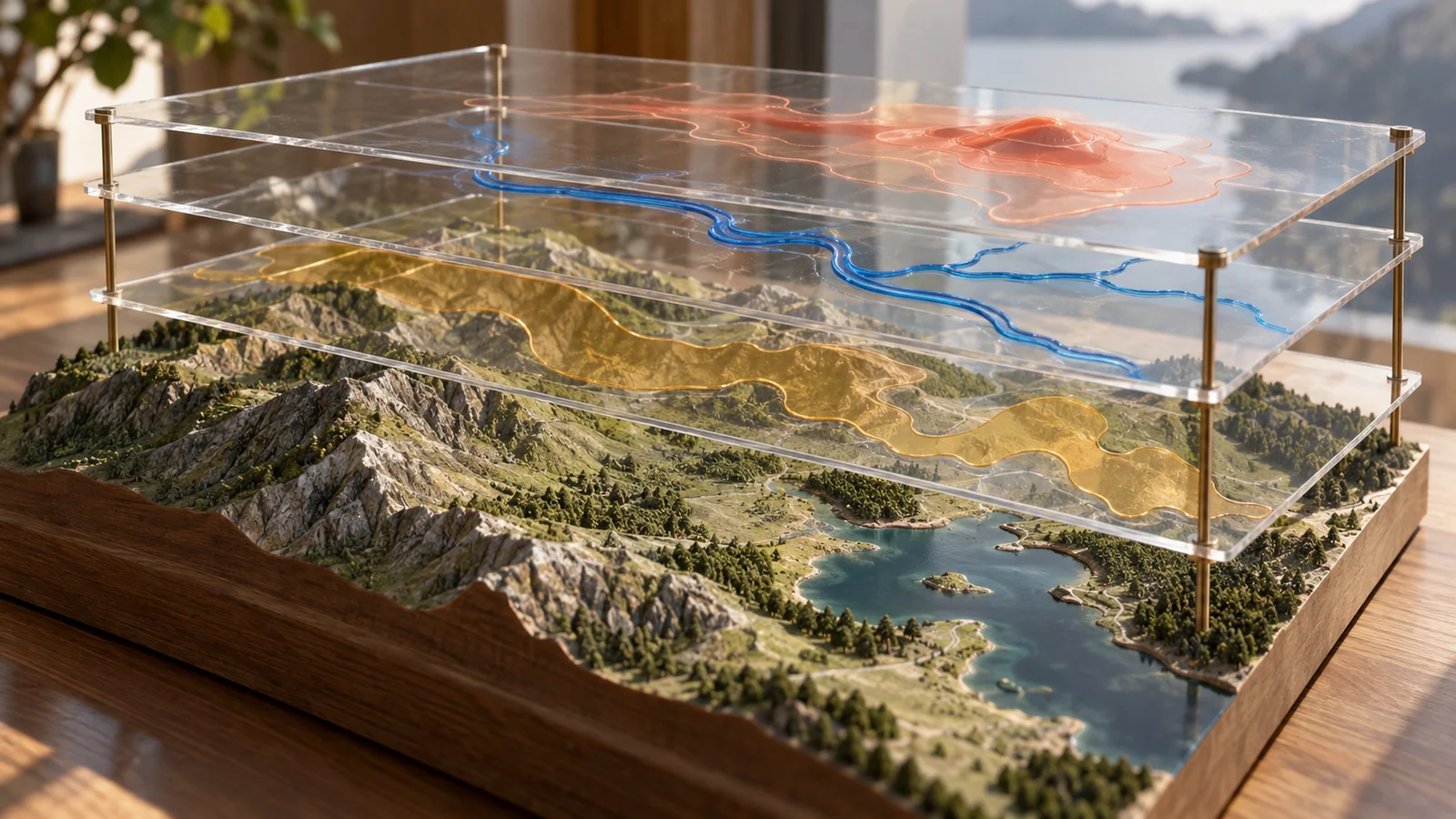
- Paradigm Four: Three-Dimensional Translucent Fusion—Heatmaps and Layers: Transparent paths and heat regions overlay a base map, combining multiple business dimensions in the same retinal coordinate system.
- Two-Dimensional Layering: Sequential Disclosure: Like turning the pages of a substantial physical book, the viewport focuses on one independent level at a time.
- Linear structures suit tasks with strong causality and strict ordering, such as registration approval or e-commerce checkout. One step must be completed before the next begins. A single path keeps cognitive load low.
- Nonlinear structures include trees, parallel alignment, and hyperlink networks. They suit knowledge bases and exploratory directories, but unchecked linking can create a labyrinth.
- Three-Dimensional Layering: Overlapping Presentation: Users remain in the same physical coordinate system while new information is overlaid or slid above the existing base. Three-dimensional here means elevation along the interface's Z-axis, not elaborate 3D modeling.
- Opaque overlays include building-detail cards in Amap and side drawers in administrative systems. The background stays fully present and stationary, making it clear which underlying entity the detail belongs to.
- Transparent overlays include weather displays combining satellite maps with translucent Doppler rainfall heat regions and vector typhoon tracks. Multiple data dimensions align precisely in the same retinal coordinates, letting viewers grasp complex intersections without moving their eyes.

2. Common Layering Failures in Interfaces
Confused layering boundaries frequently undermine enterprise software and web interaction:
2.1 Drawers That Hide Essential Reference Information
To speed up complex table editing, a team adds a half-screen drawer sliding in from the right. But the opaque, oversized drawer covers crucial reference columns, such as the original order number or comparison price. To enter a few parameters, users must repeatedly close the drawer to check the underlying data and reopen it to type. An overlay intended to improve efficiency becomes an obstructive visual burden.
2.2 Endless Multi-Step Wizards
Some product managers assume that more steps mean better usability. A simple configuration form that could fit on one page is split into eight lengthy stages. By step five, users have forgotten what they selected in step two. Without an overall preview, correcting an earlier error requires clicking Back four times, while API validation may clear all previously entered data along the way.
3. A Four-Dimensional Comparison Matrix for Information Layering
To help teams select suitable layering strategies for particular business contexts, we use the following four-dimensional filtering matrix:
| Evaluation Dimension | High-Frequency Core Functions or Assets | Low-Frequency Essential Functions or Assets | Redundant Distractions, Pseudo-Functions, or Formalism |
|---|---|---|---|
| Strongly Sequential Wizard Tasks | Keep the process to three to five steps, with a freely clickable progress indicator at the top and draft saving. | Provide a one-click switch to a complete-form mode for experienced users who enter data quickly. | Force users through more than ten trivial stages, with one field per step and no backward editing. |
| Detail Viewing and Contextual Comparison | Use a lightweight right drawer occupying 30%–40% of the width, highlight the corresponding underlying row, and keep the base context visible. | Open very extensive details in a separate tab to release the full screen for layout. | Show an enormous centered modal that covers the screen and destroys the context of the data being viewed. |
| Multidimensional Data Insight | Keep the base map neutral and subdued; use translucent bands with clear physical meaning for data layers. | Provide a clear layer-management panel so users can show or hide each layer freely. | Stack five intensely colorful, mutually obstructing opaque charts until none can be understood. |
| Mobile Layering Adaptation | Adapt complex desktop side drawers into action sheets sliding up from the bottom on mobile. | Use smooth full-screen horizontal transitions between mobile form steps, reducing reload flicker. | Persist with nested half-screen overlays on small phones, leaving only a few lines visible. |
4. JVDS's Engineering Practice for Seamless Movement Through Space and Time
In large smart-city visualizations, high-end analytics tools, and modern interaction design, JVDS turns layering into a precisely controlled perceptual system:
- Unbroken Context as an Engineering Baseline: A core JVDS rule states that opening an overlay must never hide the parent anchor that triggered it. Our intelligent side drawers keep the parent table row highlighted and leave sufficient reference space on the left. Users always understand which branch of the larger structure they are working on, eliminating disorientation.
- Transparent Fusion of Heterogeneous Data: In large digital displays and complex decision dashboards, JVDS uses professional visual layering. Static geography, real-time pedestrian movement, temperature heatmaps, and critical alert bubbles are separated into four independent rendering layers. Precisely tuned alpha channels and complementary colors allow all four to coexist at the same visual focus. Explore our design portfolio to see complex high-dimensional data presented with composure through sophisticated layering.
- Instant Switching Between a Stepwise Wizard and a Panoramic Overview: For long, complex configuration workflows, JVDS has developed a dual-mode step-and-overview architecture. Beginners can follow a carefully designed linear wizard. At any moment, clicking the overview switch in the upper-right unfolds every step into a horizontally arranged outline through a seamless zoom micro-animation. Any node can be edited directly, combining the advantages of sequential focus and a complete view.

5. Frequently Asked Questions
Q1: How should we choose between a modal, a drawer, and a separate page on the web?
Consider task independence and dependence on context:
- Modal: A lightweight, urgent, single task requiring an immediate interrupting decision, such as confirming deletion of one item or changing a password. The operation must finish within 15 seconds.
- Drawer: Deep detail viewing or secondary editing that requires frequent comparison with the current page, such as reviewing an order or modifying user permissions.
- Separate Page: A major task with a very long workflow, more than 20 inputs, or a need for a distinct URL for bookmarking and team sharing, such as creating a large marketing plan or writing code.
Q2: Why do mobile apps increasingly favor bottom sheets over centered dialogs?
This follows the ergonomics and one-handed thumb zone of modern large-screen phones. As displays grow taller, centered-dialog close buttons and upper content often fall into difficult areas beyond the thumb's reach. A bottom sheet occupies a comfortable operating radius and supports a natural downward swipe to close, matching physical intuition.
Q3: How can we avoid the unpleasant experience of nested modals?
Engineering design standards should strictly prohibit modals inside modals. If a deeper operation is needed within a dialog, use one of two approaches: first, an in-modal slide transition that preserves the dialog dimensions while sliding a secondary panel leftward into view, with a back arrow at the upper-left; or second, promote the interaction to a side drawer or separate page. Do not stack multiple masked dialogs in the middle of the screen.

















