

An asset management website contains products, teams, and documents as well as an introduction to the firm. These Arion Capital pages create a consistent appearance through large blue-green areas and rounded cards. What matters to reading, though, is whether the content stays connected: after a visitor chooses a product, do its description, terms, and downloads still clearly identify that product? Team roles and organization details also need to explain their relationships to become useful reading cues.
Key takeaways
- Parallel product cards are easy to scan, but descriptions and documents need to retain the product name.
- Putting role labels alongside personal cards can help visitors find people according to their questions.
- Organization marks, locations, and addresses serve different purposes; visual consistency should not merge them into a single kind of evidence.
Products and downloads first need a clear connection
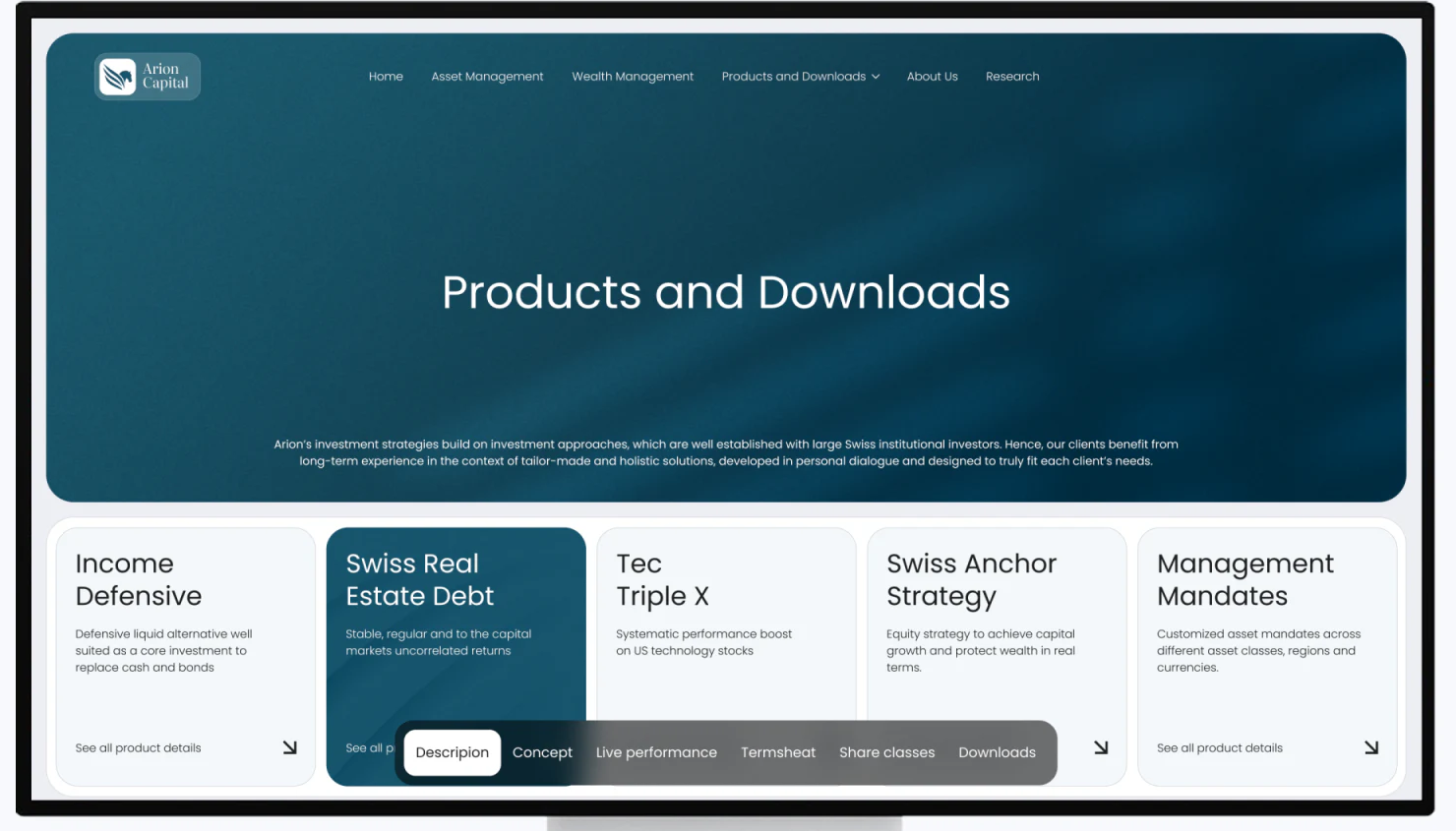
The desktop view uses Products and Downloads as a large heading, followed by five cards: Income Defensive, Swiss Real Estate Debt, Tec Triple X, Swiss Anchor Strategy, and Management Mandates. Matching dimensions, short descriptions, and lower-right arrows give each item a similar opportunity to be scanned. The second card uses dark blue-green to stand out among the pale cards.
The product cards support initial recognition, while a floating menu at the bottom lists Description, Concept, Live performance, Termsheet, Share classes, and Downloads. This gathers document types together, saving visitors from searching for each one along a long page. However, the menu does not repeat the current product name and covers part of the cards’ lower edges. A reader may know which kind of file they need without knowing which card these entries belong to.
JVDS prefers to retain the current product name in the document menu or detail heading, so both the subject and the content type remain visible. A selected color can aid recognition, but cannot explain ownership by itself. Moving from a description to downloads, or from a file back to the page, should retain the connection to the same product.
Short descriptions identify; file entries support finding
Each card contains only a few lines of introduction, enough to distinguish the general direction behind a name but not to carry complete product information. See all product details and the arrows suggest further reading. Once details open, the product heading, content sections, and file entries should form a continuous hierarchy, instead of extending a flat layout with more cards of the same size.
A file list can answer practical search questions through type, language, update date, and file size. These fields need not compete with the product name, but should appear before someone decides to open or download a file. If the five products become a horizontal arrangement on mobile, the current item also needs to stay visible, so its documents are not mistaken for shared attachments to the whole collection.
Roles connect team portraits to the business
The mobile team page starts with an introduction, then lists the labels Partner Co-Owner, “Managing Partner, CEO”, Operations, Compliance, Managing Partner, and Fund Manager. The current person’s card below combines a photograph, role, the name Gleb Streib, and an arrow. Role labels give visitors a way to move from “What do I want to ask?” to “Who should I know?”, while the photograph gives the organization a specific human subject.
These labels are very pale against white. If they switch content, the selected state and text contrast need clearer treatment; if they are simply a directory, their relationship to people should be explained. The role on the person’s card is more prominent than the labels above, reinforcing that connection. Pagination dots can indicate other members, but as the team grows, a name or role directory is easier to revisit than a series of similar dots.
The heading reads Meat our team, exposing a basic proofreading issue. On an organization page that emphasizes precision, names, positions, and section headings are all part of design quality. Their checking should not wait until the visuals are finalized.

Explain organization relationships and office locations separately
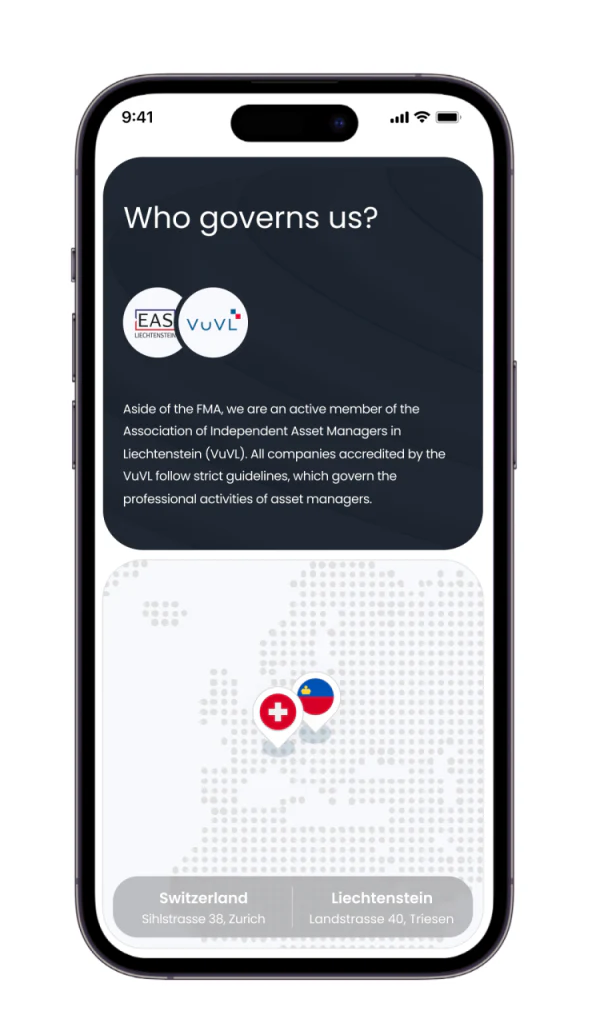
The dark Who governs us? section contains EAS and VuVL marks and a paragraph explaining the relationship. Below, a pale dotted map uses two markers for addresses in Switzerland and Liechtenstein. The change from dark to light separates the two purposes: the first should explain relationships between organizations; the second tells visitors where the offices are.
Marks identify names, while text should clarify the specific relationship and its scope. The map should preserve location names together with addresses, instead of relying on two prominent pins. When product documents, staff roles, organization descriptions, and contact details are clearly organized in their own right, a consistent palette can support reading rather than lend these contents an ambiguous conclusion.
Frequently asked questions
Why should an asset management website retain product names in its download menu?
Visitors usually select a product before looking for a description or file. If switching sections leaves only document types visible, the subject can be lost. Retaining the product name and including versions or dates in the file list keeps reading and later checks connected.
Design review checklist
- Check that each description, terms, and download entry clearly belongs to the current product.
- Check that team names, roles, section headings, and selected states are clear and consistent.
- Organize relationship explanations, office addresses, and contact details separately, and proofread names.
Keep products and documents clearly connected
If your professional services website needs to organize product introductions, team information, and several types of downloadable files, JVDS Design Studio can help map content relationships and mobile reading order through UI/UX design, website design, and development services.
Start by listing how products, files, languages, and updated versions correspond, then turn that list into a page structure visitors can search easily.

















